 YNSPIRA
Notion
Notion
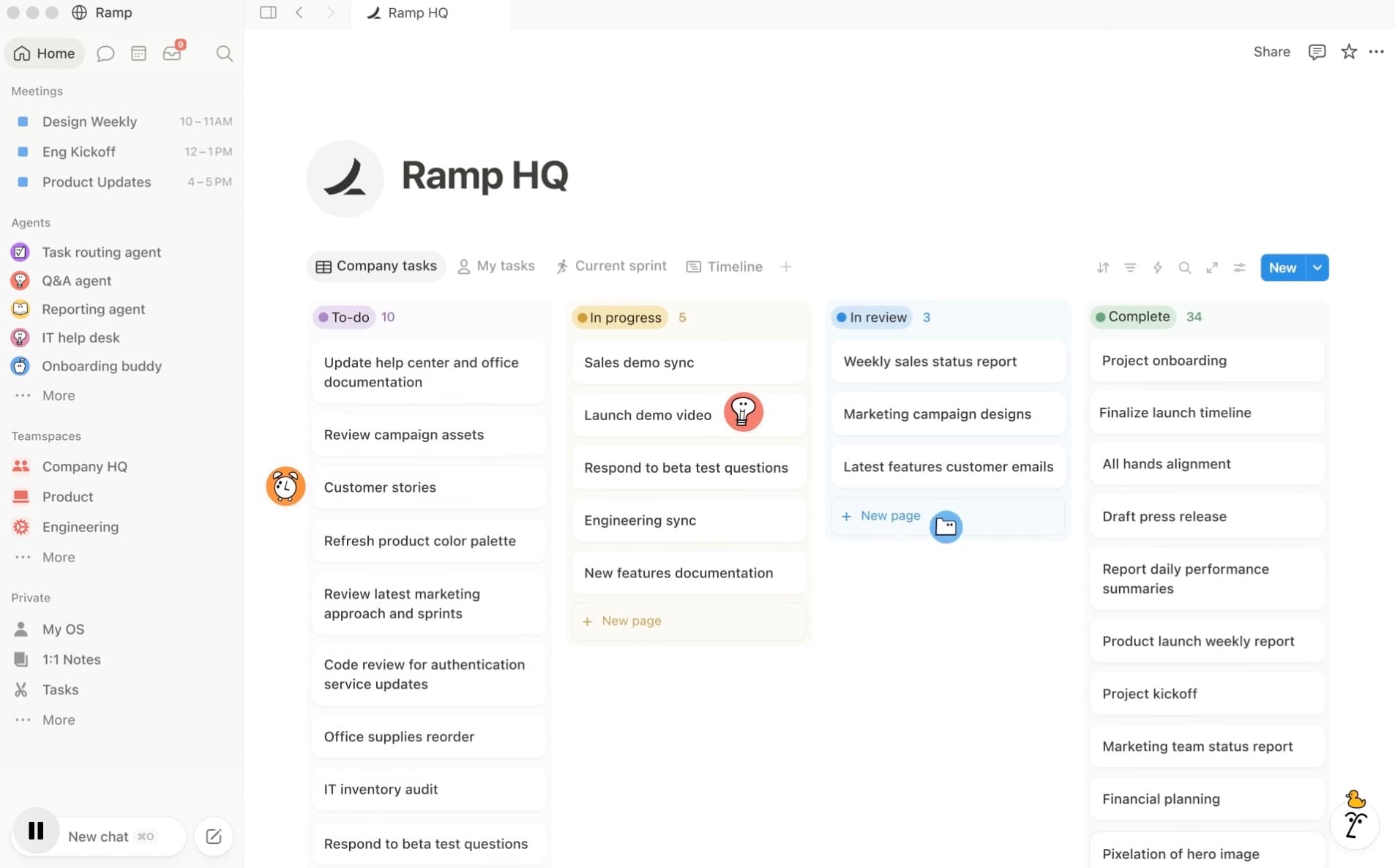
Notion is a flexible work platform where you build your own solutions, from notes, documents and wikis to task and project management, simple CRM systems and knowledge bases. All in one tool.
It lets you structure your content and connect things together exactly the way you want. That is Notion's big strength, and also the biggest hurdle for new users.
Notion AI
Notion has built-in AI that can search your content, summarize, translate, pull tasks out of meeting notes and make changes to pages and databases. You can also set up automations, skills (reusable work recipes) and simple agents that run on a schedule or when something happens in a database.
Through AI Connectors, Notion AI can also pull in and summarize information from other tools you use, such as Slack, Google Drive, Jira, Outlook or Gmail. Most Connectors require a Business or Enterprise plan. The same goes for the more advanced AI capabilities like agents and automated workflows. Notion agents also use their own credits.
Notion AI is only as good as the structure it works in. Badly organized content gives you bad AI answers, while tidy databases, clear properties and good relations give you precise answers and actions.
Who is it for?
Notion is a particularly good fit if you like putting things into systems and want a lot of flexibility in how your solutions are built and fit together. It can be an excellent tool for:
- Small businesses that don't have the time or budget to build integrations between tools
- Teams and organizations that don't need, or don't want to maintain, heavy platforms like Microsoft 365
- Anyone who likes putting things into systems and wants full control over how information is structured, linked and displayed
- Smaller teams that want to work flexibly while keeping everything in one place
It's not for you if you want a finished solution out of the box, or if you're already heavily invested in the Microsoft 365 ecosystem.
Limitations
There is no 'right' way to use Notion, and a blank page with no plan gets overwhelming fast. Notion gives you building blocks, not a ready-made way of working. A strength if you want to build it yourself, a drawback if you just want something that works without the setup.
Performance drops on large databases. Once a database passes a few thousand rows (around 5,000 and up), users notice slower loading, filtering and editing. Notion isn't built for very large amounts of data.
Free and Plus users only get a limited taste of Notion AI. If you want agents, meeting notes and search across apps, expect to need a Business plan. Notion agents also use their own credits.
Notion has limited offline use. You can read pages, but you can't freely build or edit without a connection.
How to use it
Go to notion.com, create a free account and set up a workspace. Start with a blank page or a very simple template. You can take a ready-made template and adjust it to your needs, or build a simple database from scratch if you want a solid grasp of Notion's building blocks and how the different elements fit together. Try a task board, for example: start by creating a page and adding a database. Add a few tasks, plus properties like status, due date, priority and a comment field. Then create different views such as table, board and calendar.
If you're going to use the tool properly in your everyday work, we recommend downloading the desktop app.
Relevant guides and articles
Features
Pages
The universal building block. A page can hold text, images, files, checklists, links, sub-pages and databases.
Databases
Collections of pages that share properties. The basis for everything from task lists to a CRM.
Relations
Connect databases so that related information stays linked automatically.
Notion AI
Search and ask questions across your content, summarize, translate, pull out tasks and fill in databases automatically.
AI agents and automations
Set up agents, skills and automations that run on a schedule or when something happens in a database. (Uses its own credits.)
AI Connectors
Let Notion AI pull in and summarize content from Slack, Google Drive, Microsoft Teams, Jira, Outlook and more. (Business/Enterprise.)
Templates
A large library of ready-made templates for projects, wikis, planning and much more.
Collaboration
Comments, shared teamspaces and access control for teams.
Tips for good use
- Start blank or with a very simple template. The big templates look tempting, but they're the fastest route to feeling overwhelmed.
- Learn the building blocks first. Build a database from scratch (a task board, for example) before you move on to more advanced setups.
- Structure your content so the AI can reach it easily. Tidy databases, with clear properties and good relations across them, get you better answers from Notion AI.
- Use relations instead of duplicating. Link customers, projects and meetings together once, and you avoid maintaining the same information in several places.
- Keep your databases manageable. Performance drops noticeably around 5,000 rows. You can split large databases up instead of collecting everything in one.
- You need a Business plan to get real use out of Notion AI. Free and Plus only give you a limited taste.
Available on
Links and pricing
Pricing: Free (for individuals) / Plus from $10/user per month / Business from $20/user per month (full Notion AI included) / Enterprise: custom pricing.
AI is an assistant, not an authority. Always verify what matters.