 YNSPIRA
Wispr Flow: A simple tool that changed my workday more than I expected

Do you know what Agatha Christie, Fyodor Dostoevsky and Dan Brown have in common?
They dictated a lot of their books.
Dictation isn't new. It used to be reserved for the few who could afford a personal assistant. Now it's available to anyone through AI tools.
You might be thinking: "There's been a dictation button in most apps for years. What's the point of yet another dictation tool?"
The point is that the old dictation tools weren't good enough. That's why almost no one used them.
But now we have one that actually works: Wispr Flow.
What Wispr Flow does differently
Wispr Flow is a dictation app for PC and mobile that uses AI to transcribe what you say directly where you're working.
Here's how it differs from traditional dictation tools:
- It works across every app, not just inside one program. You can use it everywhere: in the browser, ChatGPT, Word, Teams, email, and more.
- It's extremely accurate. A lot of dictation tools struggle with precision, even when you speak slowly and over-pronounce. Wispr usually gets it on the first try, even when you mumble or whisper.
- It cleans up as you talk. Yep. "Uhm", half-finished sentences you change your mind about, and repeated words usually get removed from the transcription automatically. Brilliant.
- It gives you fully formatted text. Most dictation tools hand you a wall of text with no commas, periods or paragraphs. Wispr Flow puts commas and periods where they belong, breaks the text into paragraphs, and uses bullet lists automatically.
Wispr Flow is also extremely easy to pick up. If you like dictating, you'll probably just start using it fairly spontaneously and naturally, without having to consciously turn it into a habit.
If dictation isn't your thing, you obviously don't need a dictation tool.
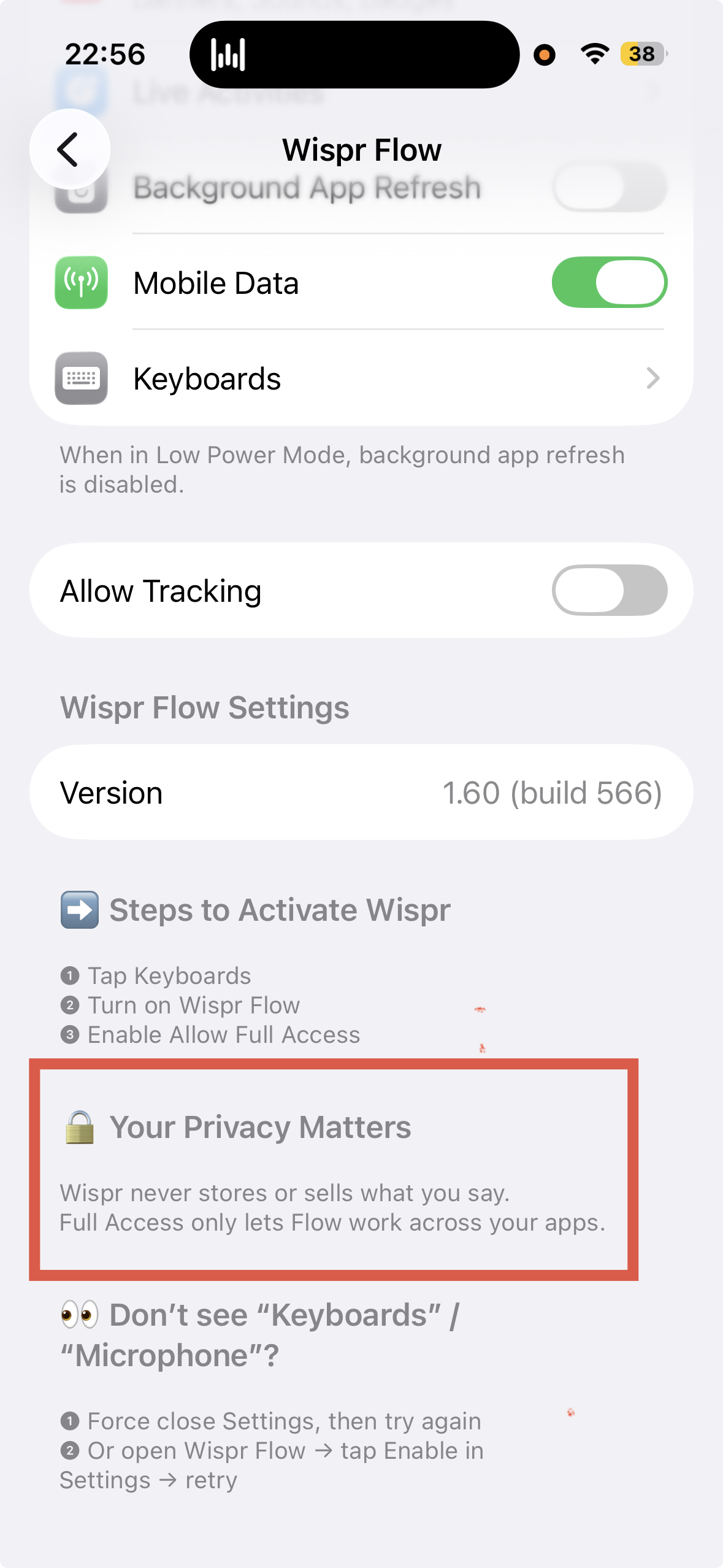
If you're not sure whether you like dictating or not, you can try Wispr Flow for free (the free version lets you dictate up to 2000 words per week). You'll figure out pretty quickly whether you're the kind of person who should integrate dictation into your life, or whether you should stick to the keyboard. 🙂
How Wispr has changed my workday
I get instantly skeptical when I read that something is "revolutionary", and I can't remember ever using that word to describe my own experience of anything. But I'm going to make an exception here, because Wispr really has revolutionized the way I work. And I have to admit I'm pretty surprised by it, given how simple the tool is.
Here are four concrete examples from my everyday work:
1. I plan my day by talking
Instead of manually adding new tasks to my digital to-do list, I do it by talking. I say out loud everything I need to do, along with other thoughts and reflections, while I get ready for the day. I dictate straight into my AI assistant, and Wispr transcribes everything accurately and neatly formatted. The assistant then sorts my tasks and thoughts (based on rules I've set up myself) and updates my to-do list automatically.
2. My AI prompts have gotten dramatically better
Since I started using Wispr Flow, my AI prompts have become more detailed and carry much more context. It's so much easier to tell an AI what I want it to do and give it a lot of background information out loud than to type it. This has made my AI use much better and more enjoyable, because prompt quality has gone up without costing me more time.
3. Most of my writing at work happens through dictation
That covers Teams messages, email, status updates and a lot of other things. The main benefit is that I work more efficiently and get more flow and joy out of my workday. It just feels more human and seamless to speak instead of constantly typing on a keyboard. My Wispr Flow stats show that I dictate an average of 134 words per minute. That's twice as fast as my typing speed.
A bonus is that I'm more relaxed, because things move faster, and I can work in a way I actually enjoy.
4. I dictate most of my articles
I think and speak much faster than I type, which means I can catch my thoughts and ideas before they slip away. Getting from a blank page to a first draft takes much less time when I dictate. I still have to spend time rewriting and editing afterwards, of course, but that doesn't change the fact that the whole writing process is dramatically faster now.
How does it actually work?
Wispr on mobile and tablet
On iPhone, Wispr Flow is an extra keyboard. Just like you can switch between a Norwegian and an English keyboard when you type, you switch between Apple's standard keyboard and the Wispr keyboard. To start dictating you also have to tap the microphone button after selecting the Wispr keyboard.
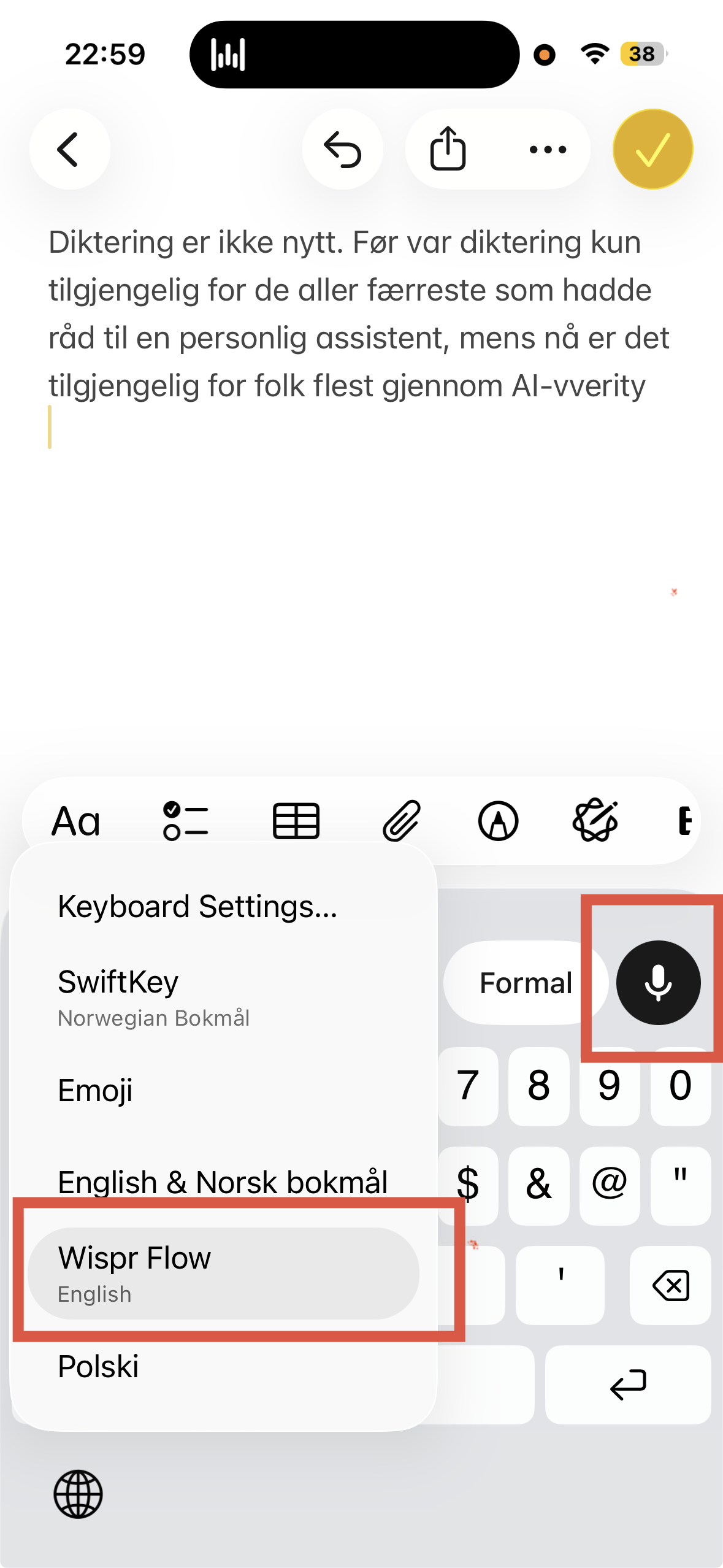
On Android it works a little differently, and even more smoothly than on iPhone. A small bubble pops up on top of your keyboard as soon as you're in a text field. Tap it when you want to start dictating.
Whichever mobile device you use, the principle is the same: the microphone is off unless you choose to turn it on.
Wispr on the computer
On PC and Mac you activate dictation by holding a shortcut key: Fn on Mac, and Ctrl + Win on Windows. The dictated text gets inserted right where you placed your cursor. You can of course change the shortcut if you prefer a different combination from the default.
There's also a hands-free mode if you don't want to hold the shortcut down while dictating longer texts.
I use Wispr on every device: iPhone, tablet and Mac, but personally I like dictating on the computer best, where dictation is triggered by a key. I really appreciate how smooth the whole thing feels, and I especially like dictating in hands-free mode so I can lean back and just talk instead of hunching over the keyboard.
Three features worth setting up
On top of regular dictation, Wispr has a bunch of other features. Here are the three I find most useful.
Dictionary lets you add the specialist terms you use.
Every dictation tool can stumble on niche words or internal terms, so it's pretty handy to add such words to the Wispr Dictionary. This can include technical terms, proper nouns, abbreviations, client names, product names and anything else that isn't standard Norwegian or English.
Set up Dictionary fairly early, before you've corrected the same mistake eleven times.
Snippets are shortcuts for text you write often.
You can think of them as rules where you define a "trigger word" and then a longer piece of text you want Wispr to swap in for the trigger word.
Some examples of snippets you can create:
- "My calendar link" — copy the URL of your booking calendar so Wispr pastes it in every time you say the trigger word
- "Standard signature" — Wispr inserts your full email signature with name, title and contact info
- "Email intro" — get Wispr to insert a standard opening line you use in customer emails
Snippets are especially useful for avoiding copy-pasting the same text over and over.
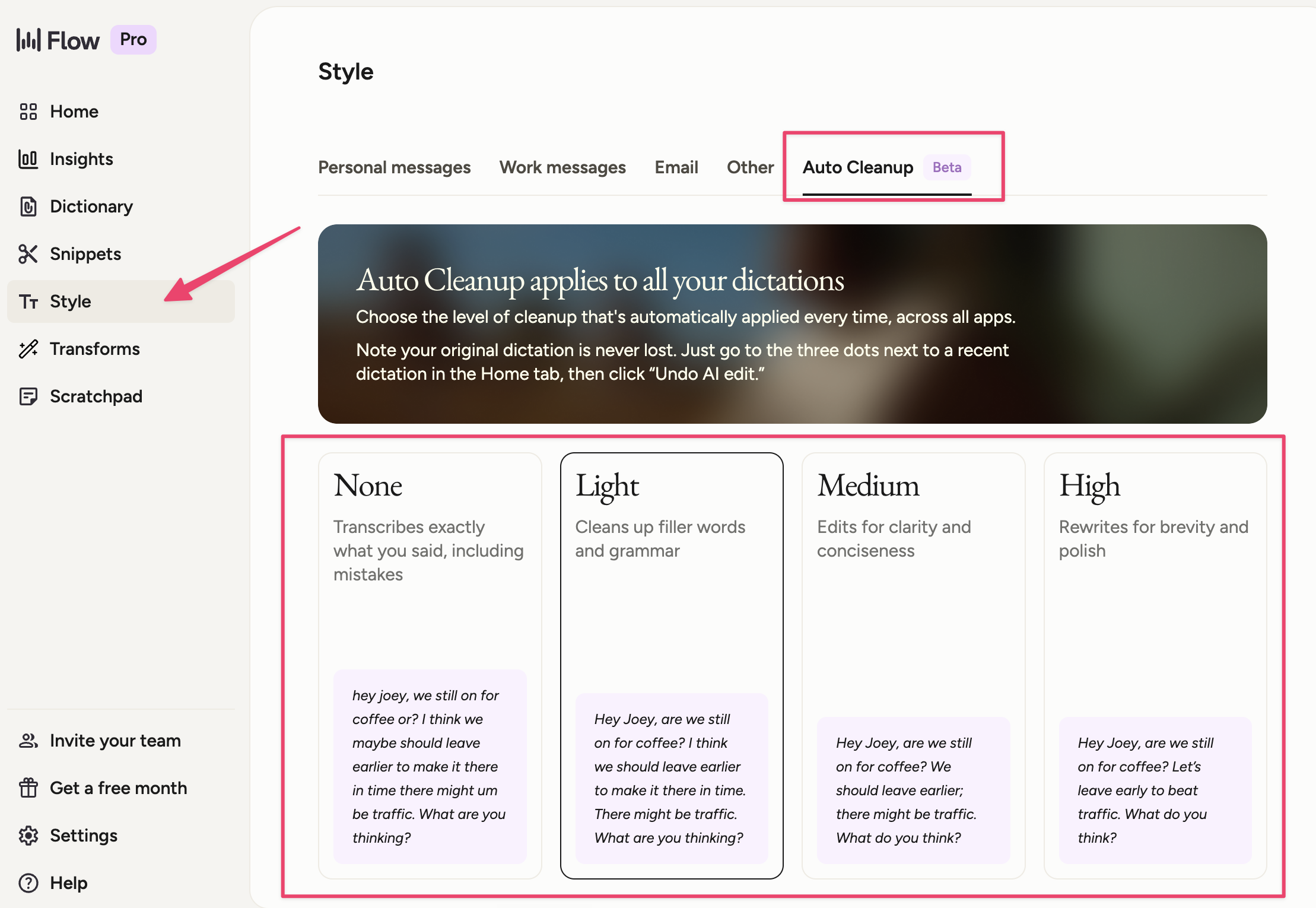
Styles lets you choose how formal and correct Wispr should be when transcribing.
Styles is a small feature you can set up in 20 seconds. It lets you set a default tone per app category, for example formal for email, casual for Teams or Slack, very casual for private messages.
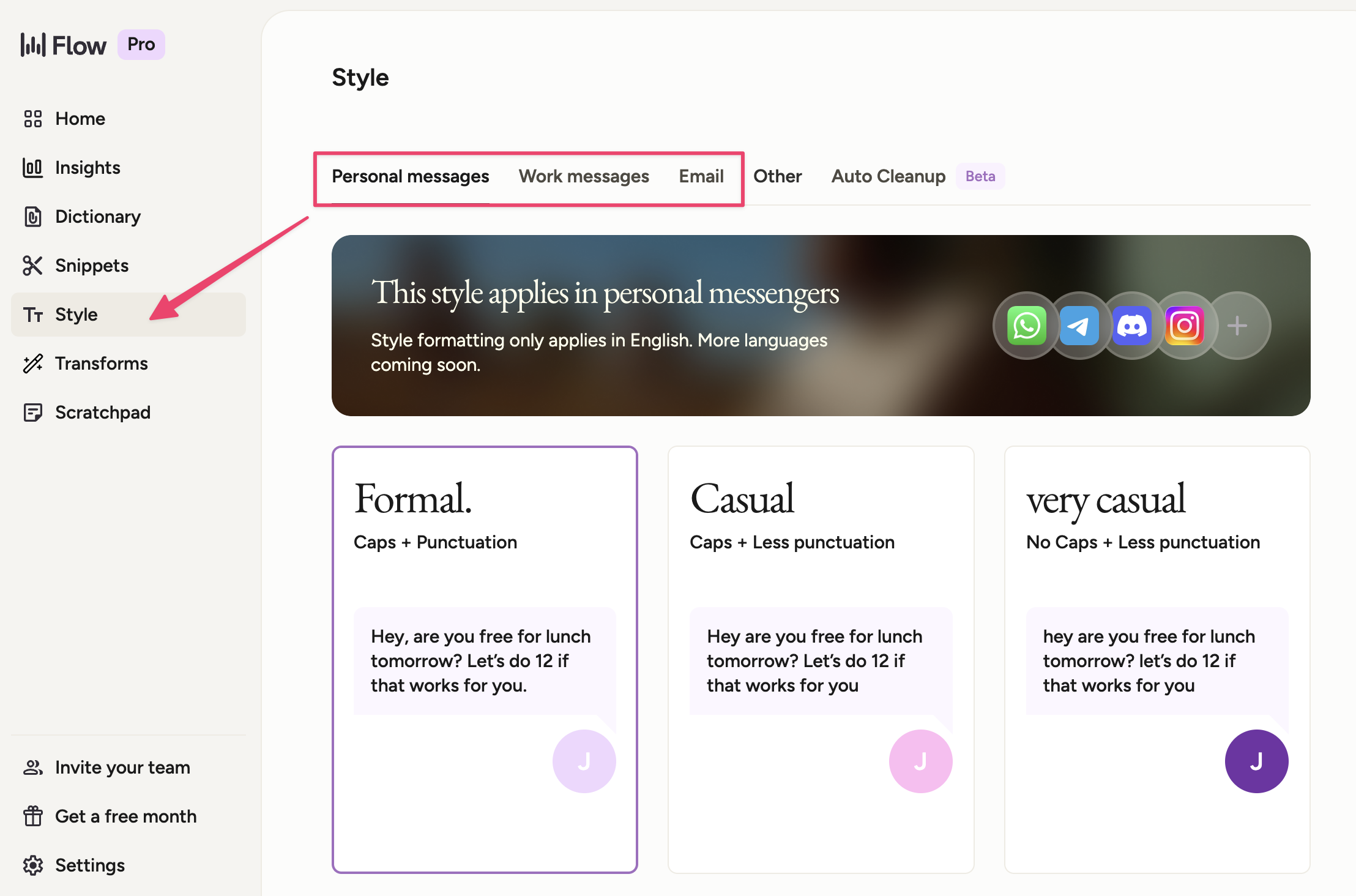
Wispr automatically detects which app you're in and adjusts the tone.
In practice that means the same words you dictate can be transcribed in different styles: as a precise and proper email in Outlook, or as a more relaxed message on Messenger.
You can also choose how much Wispr should clean up what you dictate — you'll find it in the AutoCleanup tab.
Any downsides?
Of course.
Dictation has some social limits. Your colleagues probably won't appreciate you talking out loud all day if you work in an open-plan office. I've gotten a few raised eyebrows, even from my only colleague at YNSPIRA, when I sat there dictating in our office.
So yes, you'll probably have to find a quiet room if you don't have your own office.
Dictating outdoors works really well, though. I'm now completely used to dictating through a headset while out on a walk (people probably assume I'm on the phone).
Aside from the social limits, Wispr Flow is a pretty seamless experience that has definitely made me both more efficient and happier with my workday.